Inputs
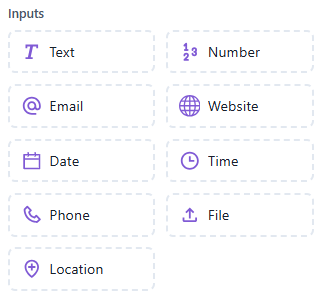
The Inputs section is used to collect information from users through different input types.
Each input element validates and captures specific types of user data, ensuring accurate and structured responses.
 Collects free-form text responses from the user.
Description: Used to capture names, feedback, or any open-ended text.
Use Case Examples:
- “What is your name?”
- “Please describe your issue.”
Key Features:
- Accepts letters, numbers, and symbols
- Ideal for general input collection
 Collects numerical input only.
Description: Validates that the user enters numbers.
Use Case Examples:
- “Enter your age.”
- “How many items do you want to order?”
Key Features:
- Blocks non-numeric characters
- Can be used for quantities, amounts, or IDs
 Collects and validates an email address.
Description:
Ensures the user provides a properly formatted email (e.g., user@example.com).
Use Case Examples:
- “Please enter your email for contact.”
- “Provide your work email.”
Key Features:
- Automatic email validation
- Prevents invalid inputs
 Collects a website or URL.
Description: Used to capture website or social media links from users.
Use Case Examples:
- “Enter your company website.”
- “Share your portfolio link.”
Key Features:
- Validates URL format (e.g.,
https://example.com)
 Collects a calendar date.
Description: Prompts the user to pick or enter a date in the required format.
Use Case Examples:
- “Select your appointment date.”
- “Enter your date of birth.”
Key Features:
- Accepts date format validation
- Supports calendar selection on compatible platforms
 Collects a specific time value.
Description: Used to capture times such as appointment or delivery hours.
Use Case Examples:
- “Select your preferred time slot.”
- “When should we call you?”
Key Features:
- Accepts time format (HH:MM)
- Works well with scheduling flows
 Collects a valid phone number.
Description: Prompts the user to enter their mobile or contact number.
Use Case Examples:
- “Please share your contact number.”
- “Enter your phone number to receive updates.”
Key Features:
- Validates numeric and phone number formats
- Can include country code normalization
 Allows users to upload a document or image file.
Description: Used to collect files such as resumes, invoices, or photos.
Use Case Examples:
- “Upload your resume.”
- “Send a photo of your receipt.”
Key Features:
- Accepts image or document uploads
- File types depend on platform settings
 Captures the user’s live or selected location.
Description: Prompts the user to share their GPS location through the chat interface.
Use Case Examples:
- “Please share your current location.”
- “Where should we deliver your order?”
Key Features:
- Captures real-time coordinates
- Useful for delivery or service-based workflows