Integrations
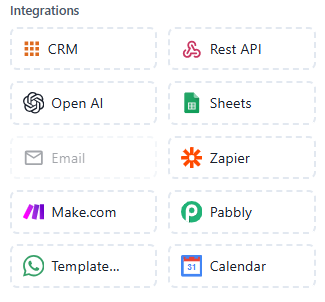
The Integrations section in the Chatbot Flow Builder allows you to connect your chatbot to various external platforms and services. These integrations enhance your chatbot’s functionality by enabling seamless data exchange, automation, and enhanced workflows.
 Integrate with a Customer Relationship Management (CRM) tool.
Usage Example:
Automatically add new leads from the chatbot to your CRM.
Features:
- Sync chatbot data with your CRM system
- Helps manage customer information and interactions
- Streamlines sales and support workflows by connecting to CRM platforms
 Connect your chatbot to any external service using a RESTful API.
Usage Example:
Fetch product data or user information from a third-party service via API.
Features:
- Integrates with any external service that provides an API
- Enables advanced functionalities like fetching external data or triggering actions
- Requires knowledge of API endpoints for setup
 Integrate with OpenAI's services for advanced conversational AI capabilities.
Usage Example:
Use GPT-3 for dynamic, natural conversations with users.
Features:
- Leverage OpenAI models for enhanced conversational abilities
- Can generate human-like responses and engage users more naturally
- Useful for AI-driven chatbots or advanced problem-solving
 Integrate with Google Sheets to manage and store data.
Usage Example:
Save user responses or order details directly into a Google Sheets document.
Features:
- Store and retrieve data from Google Sheets
- Useful for managing records, such as customer details, order history, or leads
- Enables easy data export or integration with other services
 Integrate with Zapier to automate workflows between different apps.
Usage Example:
Automatically add new subscribers from the chatbot to your email marketing list via Zapier.
Features:
- Connects your chatbot to thousands of apps and services through Zapier
- Automates workflows and tasks across various platforms
- Saves time and increases efficiency by eliminating manual processes
 Automate tasks and workflows with Make.com (formerly Integromat).
Usage Example:
Trigger actions in multiple apps based on chatbot user behavior.
Features:
- Create complex automation flows with multiple steps
- Connect and automate actions across different platforms and services
- Great for automating multi-step processes within and outside of your chatbot
 Integrate with Pabbly to automate processes and manage subscriptions.
Usage Example:
Automate user registration and subscription management using Pabbly.
Features:
- Automates workflows for user management, payments, and notifications
- Sync your chatbot with Pabbly for subscription-based services
- Useful for e-commerce or subscription-based models
Template
Use pre-built chatbot templates for easy setup.
Usage Example:
Quickly launch a sales chatbot with a pre-configured template.
Features:
- Access a library of ready-to-use chatbot templates
- Customize templates to fit your needs
- Ideal for businesses looking for quick setup and deployment
 Integrate with a calendar to schedule and manage events.
Usage Example:
Schedule an appointment or event with the user directly from the chatbot.
Features:
- Book or manage events via integration with calendar platforms (e.g., Google Calendar)
- Ideal for scheduling meetings, appointments, or reminders
- Synchronizes with existing calendar services