Messages
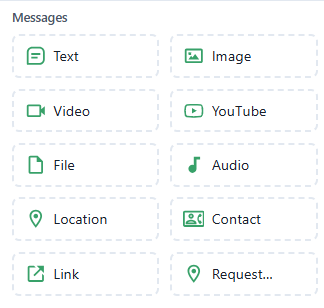
The Messages section in the Chatbot Flow Builder allows you to send different types of content to users.
Each element defines the format and purpose of your message.

Send plain text messages to the user.
Usage Example:
Hello! How can I help you today?
Features:
- Supports emojis
- Can include variables (e.g.,
{{name}})
 Send an image in the conversation.
Details:
- Upload an image or use an external URL
- Ideal for product photos, banners, or visuals
- Supported formats:
.jpg,.png, etc.
 Send a video file or clip.
Details:
- Upload an
.mp4file or provide a video link - Great for tutorials, promotional videos, or demos
 Share a YouTube video directly in chat.
Details:
- Paste a valid YouTube URL
- Displays a clickable video preview
- Ideal for showcasing content without uploading large files
 Send downloadable attachments.
Details:
- Supported types: PDF, DOCX, XLSX, etc.
- Example: “Download our brochure” or “View your invoice”
 Send an audio or voice message.
Details:
- Upload an
.mp3or similar file - Perfect for audio greetings or voice-based content
 Share a map pin or location.
Details:
- Send a predefined location
- Opens in Google Maps or other navigation apps
- Commonly used to show store or event locations
 Send a saved contact card.
Details:
- Includes name, phone number, and optional details
- Shared as a vCard (contact file)
- Useful for providing support or sales representative info
 Send a clickable hyperlink.
Details:
- Example: “Visit our website: www.example.com”
- Can include preview metadata if supported by the platform
 Request the user's live location.
Details:
- Prompts the user to share GPS coordinates
- Useful for delivery, service, or pickup-based workflows