This feature allows users to opt out or resume receiving messages from your system using simple keywords.
- When users opt out, they are added to a DND list.
- When they opt back in, they are removed from the list.
- This ensures user privacy and compliance with communication regulations.
How It Works
- Opt Out: User sends the keyword STOP → added to DND list → no further messages.
- Opt In: User sends the keyword START → removed from DND list → messages resume.
- Keywords are case-insensitive and can be sent anytime via chat.
System Response Messages
- When a user sends STOP or START, the system automatically replies with a confirmation message using predefined Message Codes.
How to Configure
1. Create Message Templates:
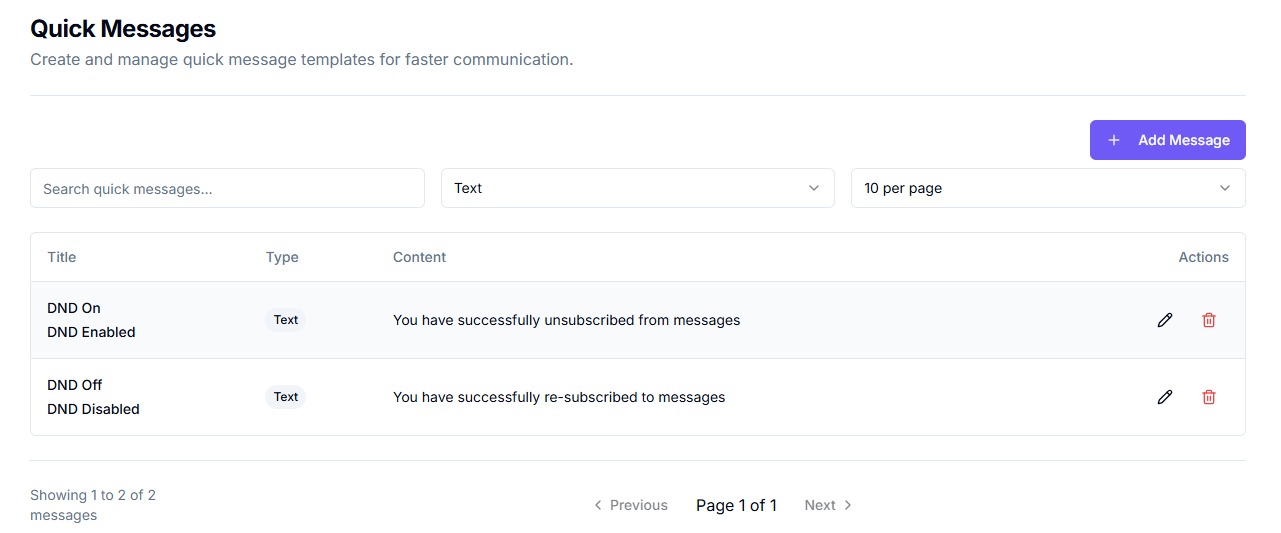
- Go to your Quick Messages.
- Create two messages:
- One for DND Enabled (e.g., “You have successfully unsubscribed from messages.”)
- One for DND Disabled (e.g., “You have successfully re-subscribed to messages.”)
2. Assign Message Codes:
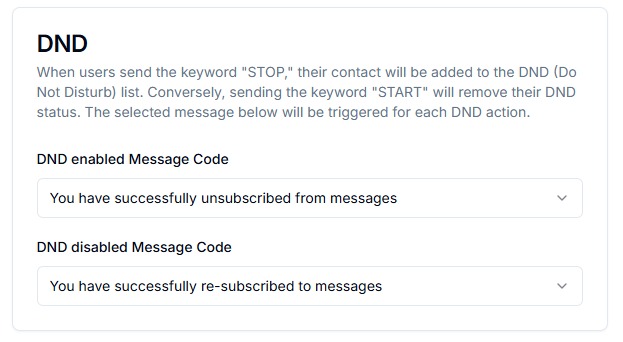
- Navigate to the DND settings.
- Set the DND Enabled Message Code and DND Disabled Message Code to the codes of the templates you just created.
3. Test the Flow:
-
Send STOP from a test user and ensure the correct message is received.
-
Then send START and verify the re-subscription message.
-
Important: You must configure these Message Codes before enabling DND responses. Without them, users will not receive confirmation messages.
Ensure selected message codes are created in the messaging system beforehand.