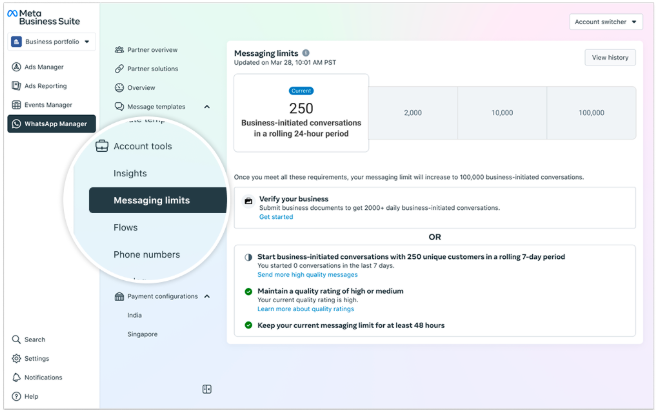
Messaging limits refer to the maximum number of unique WhatsApp user phone numbers your business can message outside of a customer service window within a moving 24-hour period.
Calculation and Sharing of Limits
Messaging limits are set at the business portfolio level and are shared across all business phone numbers within that portfolio. If multiple numbers exist, one number can consume the portfolio’s entire messaging capacity.
Default Limits for New Portfolios
Newly created business portfolios start with a limit of 250 messages. This can be increased to the following levels:
- 2,000 (by completing a scaling path)
- 10,000 (via automatic scaling)
- 100,000 (via automatic scaling)
- Unlimited (via automatic scaling)
Increasing Your Limit
To increase your limit to 2,000, you must complete one of the scaling paths. Once achieved, further increases occur automatically if you meet Meta’s automatic scaling criteria.
Scaling Paths
You can complete one of the following:
- Verify your business
- Have your solution provider verify your business (if applicable)
- Send 2,000 delivered messages outside customer service windows to unique users within 30 days using high-quality templates
After completion, Meta analyses your message quality to determine eligibility for automatic scaling.
Automatic Scaling Criteria
After reaching a 2,000 limit, your messaging limit can automatically increase if:
- You send high-quality messages across all phone numbers and templates
- You’ve used at least half of your current messaging limit in the last 7 days
If both criteria are met, Meta increases the portfolio’s limit by one level within 6 hours.
Checking Your Limit
You can check your current messaging limit via:
Meta Business Suite → WhatsApp Manager → Account Tools → Messaging Limits Panel